How ChatGPT and Claude Generate SSRF Vulnerabilities
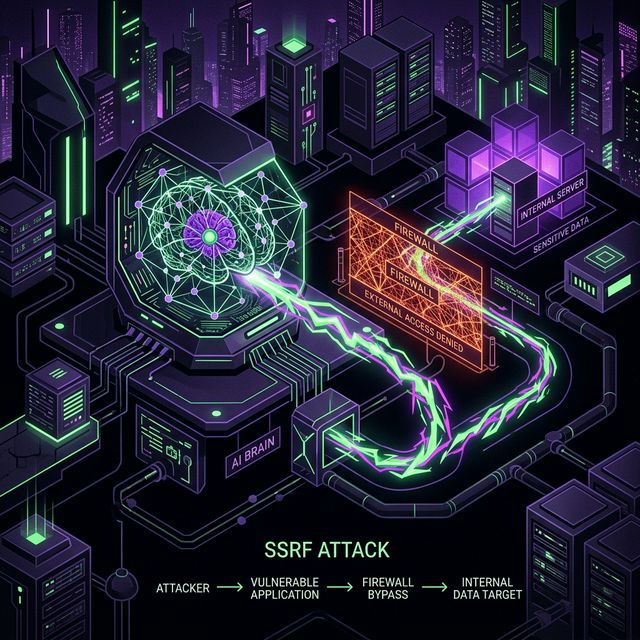
AI often generates unsafe URL fetch code leading to Server-Side Request Forgery (SSRF). Learn why it happens and how to secure Next.js API routes.
When you ask an AI assistant like Cursor or ChatGPT to build a feature that downloads an image or fetches link previews, the AI almost always outputs a vulnerable implementation. The vulnerability is called Server-Side Request Forgery (SSRF), and it's been responsible for some of the largest data breaches in recent history.
What Is SSRF? A Plain English Explanation
Your web application runs on a server. That server exists inside a network — your cloud provider's VPC, your Kubernetes cluster, or your hosting provider's infrastructure. From that server's perspective, there are many resources that are accessible: internal databases, caching layers, admin panels, the cloud provider's metadata API.
Server-Side Request Forgery is a vulnerability where an attacker can trick your server into making HTTP requests to arbitrary destinations — including those internal resources. The attacker doesn't make the request themselves; they make your server make it on their behalf.
The attack looks like this:
- Your app has a feature: "Enter a URL and we'll fetch a preview"
- The user enters
http://169.254.169.254/latest/meta-data/iam/security-credentials/ - Your server makes a request to that URL
- The AWS instance metadata service responds with temporary AWS credentials
- The attacker now has IAM keys to your entire cloud account
Because the request comes from inside your server, internal firewalls and network ACLs allow it. The metadata service is designed to be reachable by services running on the instance — it can't distinguish a legitimate request from your app from a malicious one triggered by user input.
The 5 Most Dangerous SSRF Targets
1. AWS Instance Metadata Service (IMDS)
URL: http://169.254.169.254/latest/meta-data/
This is the most dangerous SSRF target in cloud environments. It returns temporary IAM credentials for the EC2 instance's role. With those credentials, an attacker can access every AWS service the instance has permission to use: S3 buckets, RDS databases, SSM parameters, Lambda functions.
AWS IMDSv2 requires a PUT request to get a session token first, which blocks some naive SSRF exploits. But if your server-side code follows redirects or if the SSRF can make arbitrary HTTP methods, IMDSv2 doesn't help.
2. Google Cloud Metadata Service
URL: http://metadata.google.internal/computeMetadata/v1/
Similar to AWS, Google Cloud's metadata service returns service account tokens and instance configuration data.
3. Redis and Memcached
URLs: http://localhost:6379, redis://localhost:6379
If your app uses Redis for sessions, rate limiting, or caching, an SSRF can allow an attacker to interact with Redis via the Gopher protocol (gopher://) or raw TCP, potentially clearing your session store, reading cached data, or (with Redis commands) writing to the filesystem.
4. Internal Admin Panels
URLs: http://localhost:8080/admin, http://10.0.0.5:9090
Many applications have admin interfaces that listen on localhost or internal IPs without authentication, assuming they're not reachable from the internet. SSRF breaks that assumption entirely.
5. Other Internal Services
Internal microservices, message queues, Elasticsearch clusters, Kubernetes API servers, and Docker daemon sockets. Many of these are designed to trust requests from within the cluster without authentication.
Blind SSRF vs. Reflected SSRF
Reflected SSRF is the straightforward variant: the response from the internal request is returned to the attacker. They can see the AWS credentials, the admin panel HTML, or the Redis response directly.
Blind SSRF is more subtle and more common in practice. The server makes the internal request but doesn't return the response to the user. The attacker can still:
- Detect which internal ports are open by timing differences (open ports respond faster than closed ones)
- Exfiltrate data via DNS — if the app makes DNS lookups as part of the request, an attacker can observe which subdomains of their controlled domain get resolved
- Trigger internal state changes (sending commands to Redis, hitting internal API endpoints that have side effects)
Blind SSRF is harder to exploit but harder to detect and should be taken as seriously as reflected SSRF.
Why AI Assistants Generate SSRF
LLMs are trained on billions of lines of code. The vast majority of that code is written for the happy path: fetch a URL, return the response. In tutorial code, blog posts, and Stack Overflow answers, the URL is always something safe like https://api.github.com/users/octocat. Nobody validates the URL in a tutorial because the tutorial author controls the URL.
When you ask an AI to "build a feature that fetches a URL summary," the model pattern-matches to the most common implementation it has seen: call fetch() with the user-provided URL, return the result. The validation step simply doesn't appear in most training examples for this kind of feature.
This is a structural problem with how LLMs learn, not a fixable bug in specific models. ChatGPT, Claude, Copilot, and Cursor all exhibit this pattern to varying degrees. The defensive patterns (DNS pre-validation, IP range blocking) are less common in training data than the vulnerable patterns, so the models generate them less frequently.
The AI-Generated Code (Vulnerable)
If you type "Create a Next.js route that fetches metadata from a URL", the AI typically generates:
// app/api/preview/route.ts
export async function POST(req: Request) {
  const { url } = await req.json();

  // ❌ DANGEROUS: No validation whatsoever
  const response = await fetch(url);
  const text = await response.text();

  return Response.json({ text });
}
More AI-Generated SSRF Patterns
Image proxy:
// "Build an image proxy to avoid CORS issues"
export async function GET(req: Request) {
  const imageUrl = new URL(req.url).searchParams.get("url");
  const res = await fetch(imageUrl!);  // ❌ SSRF
  return new Response(res.body, {
    headers: { "Content-Type": res.headers.get("Content-Type")! }
  });
}
Webhook validator:
// "Validate that a webhook URL is reachable before saving it"
export async function POST(req: Request) {
  const { webhookUrl } = await req.json();
  const test = await fetch(webhookUrl, { method: "POST", body: "{}" }); // ❌ SSRF
  return Response.json({ reachable: test.ok });
}
Link unfurler:
// "Unfurl URLs for Slack-style link previews"
app.get('/unfurl', async (req, res) => {
  const html = await axios.get(req.query.url);  // ❌ SSRF
  const title = html.data.match(/<title>(.*?)<\/title>/)?.[1];
  res.json({ title });
});
All three are legitimate features. All three are vulnerable to SSRF. The fix is the same for each.
The Secure Fix: DNS Pre-Validation
The hostname-based blocklist approach (checking if the hostname contains "localhost") is insufficient. An attacker can register a domain with a DNS record that resolves to 127.0.0.1. The hostname passes the check, but the actual request goes to localhost.
The correct fix resolves DNS before making the request and validates the resolved IP:
import dns from "dns/promises";
import { URL } from "url";

const PRIVATE_IP_RANGES = [
  /^10\.\d+\.\d+\.\d+$/,
  /^172\.(1[6-9]|2\d|3[01])\.\d+\.\d+$/,
  /^192\.168\.\d+\.\d+$/,
  /^127\.\d+\.\d+\.\d+$/,
  /^169\.254\.\d+\.\d+$/,  // link-local (AWS metadata)
  /^0\.\d+\.\d+\.\d+$/,
  /^::1$/,                   // IPv6 loopback
  /^fc[0-9a-f]{2}:/i,       // IPv6 unique local
  /^fe80:/i,                 // IPv6 link-local
];

async function validateUrl(rawUrl: string): Promise<string> {
  let parsed: URL;
  try {
    parsed = new URL(rawUrl);
  } catch {
    throw new Error("Invalid URL format");
  }

  // Only allow http and https
  if (!["http:", "https:"].includes(parsed.protocol)) {
    throw new Error("Protocol not allowed");
  }

  // Block URLs with explicit IP addresses (no DNS needed to check)
  const hostname = parsed.hostname;
  if (PRIVATE_IP_RANGES.some(r => r.test(hostname))) {
    throw new Error("Private IP addresses are not allowed");
  }

  // Resolve DNS and validate the resulting IP addresses
  let addresses: string[];
  try {
    addresses = await dns.resolve4(hostname);
  } catch {
    throw new Error("DNS resolution failed");
  }

  if (addresses.length === 0) {
    throw new Error("No DNS records found");
  }

  for (const ip of addresses) {
    if (PRIVATE_IP_RANGES.some(r => r.test(ip))) {
      throw new Error(`Resolved IP ${ip} is in a private range`);
    }
  }

  return rawUrl;
}

export async function POST(req: Request) {
  const { url } = await req.json();

  try {
    await validateUrl(url);
  } catch (error) {
    return new Response(
      JSON.stringify({ error: error instanceof Error ? error.message : "Invalid URL" }),
      { status: 400 }
    );
  }

  const response = await fetch(url, {
    signal: AbortSignal.timeout(10000),  // 10-second timeout
    redirect: "follow",
    headers: { "User-Agent": "MyApp/1.0 URL Preview Bot" }
  });

  return Response.json({ text: await response.text() });
}
Allowlist vs Blocklist
For features where you only need to fetch from known domains (e.g., a Slack integration that only needs to unfurl URLs from github.com, linear.app, and notion.so), an allowlist is strictly more secure than a blocklist:
const ALLOWED_DOMAINS = new Set([
  "github.com",
  "api.github.com",
  "linear.app",
  "notion.so",
]);

function isAllowedUrl(url: string): boolean {
  try {
    const parsed = new URL(url);
    return ALLOWED_DOMAINS.has(parsed.hostname.toLowerCase().replace(/^www\./, ""));
  } catch {
    return false;
  }
}
An allowlist approach means you don't have to maintain a list of all possible private IP ranges — you simply reject everything not on the approved list.
The Nuclear Fix: Egress Firewall
The most robust protection doesn't rely on application-level validation at all. Block outbound connections to private IP ranges at the network or OS level:
# Linux iptables — block outbound to AWS metadata and private ranges
iptables -A OUTPUT -d 169.254.169.254 -j DROP
iptables -A OUTPUT -d 10.0.0.0/8 -j DROP
iptables -A OUTPUT -d 172.16.0.0/12 -j DROP
iptables -A OUTPUT -d 192.168.0.0/16 -j DROP
In Kubernetes, use NetworkPolicies to restrict egress. In AWS, use VPC security groups. In Google Cloud, use VPC firewall rules.
Even with a network-level egress firewall, application-level validation is still valuable — it provides defense in depth and gives you better error messages than a connection timeout.
SSRF in Different Frameworks
Express.js:
// Vulnerable
app.get('/proxy', async (req, res) => {
  const response = await axios.get(req.query.url);
  res.send(response.data);
});

// Fixed — validate before fetching
app.get('/proxy', async (req, res) => {
  try {
    await validateUrl(req.query.url);
    const response = await axios.get(req.query.url, { timeout: 10000 });
    res.send(response.data);
  } catch (err) {
    res.status(400).json({ error: err.message });
  }
});
FastAPI (Python):
import httpx
import dns.resolver
from urllib.parse import urlparse

@app.post("/fetch-preview")
async def fetch_preview(url: str):
    parsed = urlparse(url)
    if parsed.scheme not in ("http", "https"):
        raise HTTPException(status_code=400, detail="Invalid protocol")

    # Resolve DNS and check for private IPs
    try:
        answers = dns.resolver.resolve(parsed.hostname, "A")
    except Exception:
        raise HTTPException(status_code=400, detail="DNS resolution failed")

    for rdata in answers:
        ip = str(rdata)
        if ip.startswith(("10.", "172.16.", "192.168.", "127.", "169.254.")):
            raise HTTPException(status_code=403, detail="Private IP blocked")

    async with httpx.AsyncClient(timeout=10.0) as client:
        response = await client.get(url)
    return {"text": response.text}
Real-World SSRF Incidents
The Capital One breach of 2019 is the most famous SSRF incident: 100 million credit card applications were exposed. The attacker exploited a misconfigured WAF (web application firewall) to make server-side requests to the AWS metadata endpoint, retrieved IAM credentials, and used those credentials to access S3 buckets containing customer data.
In 2022, an SSRF vulnerability in GitLab's "Import from URL" feature was exploited to make GitLab servers fetch data from internal Kubernetes API servers, potentially leaking secrets from internal CI/CD pipelines.
These incidents demonstrate that SSRF is not a theoretical vulnerability — it's actively exploited against real applications, including those built by security-conscious teams.
For broader context on where SSRF fits among all vibe-coding vulnerabilities, see Top 5 Vulnerabilities in AI-Generated Apps. For how Cursor specifically generates SSRF patterns in Next.js, see Cursor AI Security Flaws.
FAQ
My app only fetches URLs from a form that requires login. Does SSRF still matter?
Yes. Authentication prevents anonymous exploitation, but authenticated users can still be attackers — either malicious users, or legitimate users whose accounts have been compromised. Any feature that fetches user-supplied URLs needs SSRF protection regardless of authentication.
Is blocking 169.254.169.254 in the hostname enough?
No. A determined attacker will use DNS rebinding: register a domain that initially resolves to a public IP (passing your check), then change the DNS record to 169.254.169.254 after the validation but before the actual request. True protection requires resolving DNS and validating the IP before making the request, as shown in the fix above.
Does Cloudflare or a CDN protect against SSRF?
No. Cloudflare sits in front of your application and handles public traffic. SSRF exploits the server making outbound requests from inside your network. Those requests bypass Cloudflare entirely.
How does VibeShield detect SSRF vulnerabilities?
VibeShield sends SSRF probe payloads to every endpoint that accepts URL parameters or has URL-like input fields. It tests for responses that indicate the server contacted an internal service — including timing-based detection for blind SSRF. It also checks for the vulnerable code patterns in your source maps and JavaScript bundles.
Never trust AI-generated fetch wrappers blindly. VibeShield automatically tests thousands of SSRF permutations against your API to ensure your internal network stays internal.
Free security scan
Test your app for these vulnerabilities
VibeShield automatically scans for everything covered in this article and more — 18 security checks in under 3 minutes.
Scan your app free